Updated: 06/15/2026
When people talk about SEO, they often confuse a website title with an article title. Both describe a webpage and are important for on-page SEO, content optimization, search intent, user engagement, and search engine visibility. However, they work in different ways and target different audiences.
A website title, also called a title tag, helps search engines understand a page and often appears in Google search results. An article title, usually the H1 heading, is the main headline visitors see after they land on the page.
At Wise Advertisement, we believe in knowledge, so join us to understand the difference between website title vs article title to improve your rankings, increase click-through rates, and create a better user experience.
Table of Contents
ToggleA Quick Comparison of Website Titles and Article Titles
Aspect | Website Title (Title Tag) | Article Title (H1) |
Definition | The title stored inside the HTML title tag | The main heading shown on the webpage |
Main Goal | Help rankings and attract clicks from search results | Help readers understand the page topic |
Location | Inside the page code | At the top of the page content |
Where It Appears | Google search results, browser tabs, bookmarks | On the webpage itself |
Visible on Page | Usually no | Yes |
Visible in Google | Yes | Sometimes Google may use it |
Audience | People searching online | Visitors already on the page |
SEO Importance | Very high | High |
User Experience Focus | Moderate | Very high |
Character Length | Usually 50–60 characters | Usually 40–80+ characters |
Brand Name | Often included | Usually not needed |
Optimization Focus | Keywords, search intent, click-through rate | Readability, engagement, content clarity |
What is the Difference Between Website Title vs Article Title?
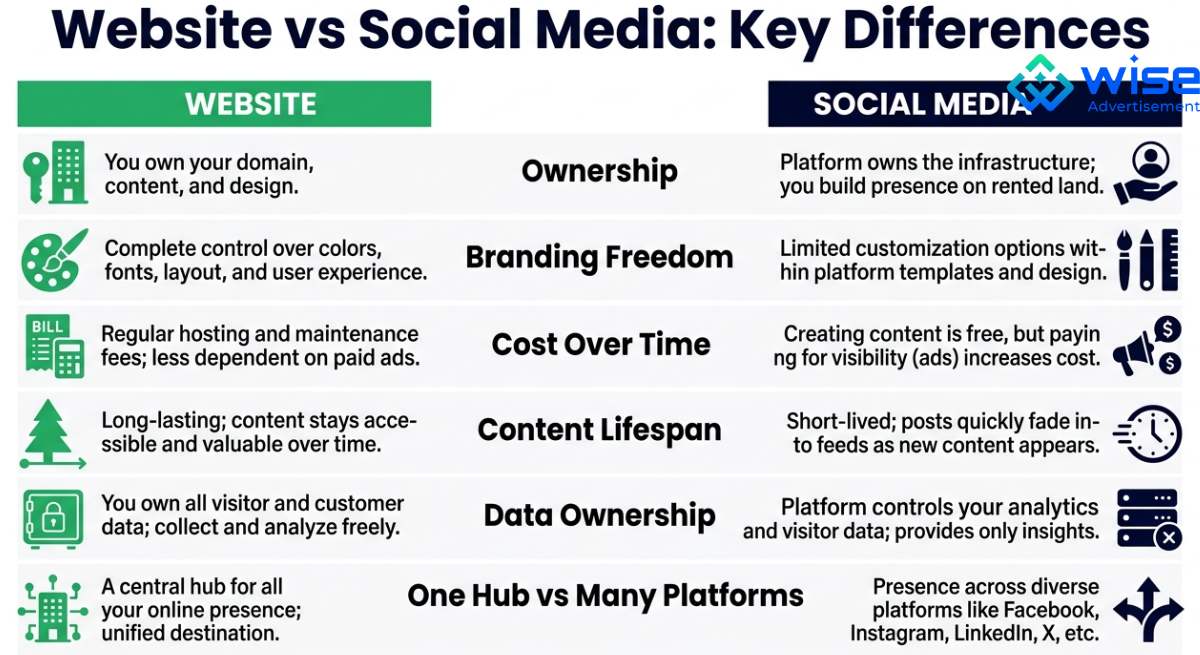
Although both titles describe the same page, they serve different roles in SEO and content marketing. The website title helps users decide whether to click a search result. The article title helps visitors understand the content after they arrive on the page.
Definition
A website title is the text placed inside the HTML <title> tag. Search engines often use it as the clickable blue link in search results. It is also the text users see in browser tabs.
An article title is the main heading of a page. It is usually created with an H1 tag and appears at the top of the content. It tells readers exactly what the page is about.
Purpose
The purpose of a website title is to improve visibility in search results and encourage users to click. A strong title tag can improve click-through rate and help search engines understand the page topic.
The purpose of an article title is to engage readers and confirm they landed on the right page. It introduces the content and sets expectations for the information that follows.
Where It Appears
A website title appears in:
- Google search results
- Browser tabs
- Bookmarks
- Social sharing previews
An article title appears:
- At the top of a blog post
- At the top of a service page
- At the top of a landing page
- Inside the webpage content
This difference is important because users see the website title before they click and see the article title after they arrive.
SEO Focus
Website titles focus on:
- Primary keywords
- Search intent
- Click-through rate
- Brand recognition
For example: Website Title vs Article Title: Key Differences | Wise Advertisement
Article titles focus on:
- Readability
- User engagement
- Content relevance
- Topic clarity
For example: Understanding the Difference Between Website Title vs Article Title
The two titles can be similar, but they do not need to be identical. In many cases, keeping them slightly different helps improve SEO and user experience.
Length
Website titles should usually stay around 50 to 60 characters to reduce truncation in search results. Long titles may get cut off by Google.
Article titles can be longer because they appear on the page itself. Many high-performing articles use descriptive H1 headings between 40 and 80 characters.


Website Title vs Article Title Examples
The examples below show how website titles and article titles can change based on the type of content. A service page, blog post, guide, comparison article, and list article may all need a different title style.
Content Type | Website Title | Article Title |
Service page | SEO Services for Small Businesses | Wise Advertisement | SEO Services That Help Small Businesses Grow Online |
How-to article | How to Improve Local SEO | Wise Advertisement | How to Improve Local SEO for Your Business |
Comparison article | SEO vs PPC: Which Marketing Strategy Is Better? | Wise Advertisement | SEO vs PPC: Key Differences, Benefits, and Costs |
Beginner guide | SEO Basics for Small Businesses | Wise Advertisement | A Simple Guide to SEO for Small Business Owners |
List article | Best Digital Marketing Tips | Wise Advertisement | 10 Digital Marketing Tips to Help Your Business Get More Leads |
Local landing page | Digital Marketing Agency in Scottsdale | Wise Advertisement | Digital Marketing Services for Businesses in Scottsdale |
Problem-solving article | Why Your Website Is Not Ranking | Wise Advertisement | Why Your Website Is Not Ranking on Google and How to Fix It |
Product page | Running Shoes for Men | Online Store | Lightweight Running Shoes for Men |
Medical blog | Dental Implant Pain Guide | Atrium Dental | Dental Implant Pain: What Is Normal and When to Call a Dentist |
Immigration guide | K-1 Visa Requirements | Visa Library | Complete K-1 Visa Requirements Guide for Couples |
Best Practices for Website Titles
A strong website title can improve rankings and increase clicks. Follow these best practices:
- Put the main keyword near the start of the title.
- Keep most website titles around 50 to 60 characters.
- Remember that Google cuts titles based on pixel width, not only character count.
- Make the title match the exact page topic.
- Match the search intent behind the keyword.
- Use one clear title for each page.
- Add the brand name at the end when it helps trust or recognition.
- Use location terms for local service pages, such as “SEO Agency in Scottsdale.”
- Avoid repeating the same keyword many times.
- Avoid vague titles like “Home” or “Services.”
- Do not use clickbait that does not match the page.
- Check the live search result after indexing to see if Google changed your title.
- Update titles on pages with low click-through rates or falling traffic.
How to Write a Good Article Title
A strong article title helps readers understand the content immediately. Use these tips:
- Use one clear H1 for the main page topic.
- Include the main keyword naturally.
- Make the article title close to the website title, but not always identical.
- Write for the reader, not just Google.
- Tell users what the article covers.
- Use simple words that are easy to scan.
- Add a clear benefit when it makes sense.
- Make the H1 more descriptive than the website title when needed.
- Avoid broad titles like “SEO Tips” if the article covers a specific topic.
- Do not promise information that the article does not provide.
- Keep the title readable on mobile screens.
- Use H2 and H3 headings under the H1 to organize the article.
- Make sure the article title matches the content, intro, and search intent.
Can the Website Title and Article Title Be the Same?
Yes, the website title and article title can be the same. This works well when the page topic is simple, and the title is already clear. In fact, many websites use the same text for both the title tag and the H1 heading, especially on simple pages.
For example:
- Website and Article Title: Local Phoenix SEO Services for Small Businesses
This keeps the page focused and easy to understand.
However, they do not always need to be identical. In many cases, using slightly different versions can improve SEO and user experience. The website title can focus more on search visibility and clicks, while the article title can provide more detail for readers.
For example:
- Website Title: Local SEO Services for Small Businesses | Wise Advertisement
- Article Title: How Local SEO Services Help Small Businesses Get More Customers
Both titles focus on the same topic, but they do different jobs. The website title helps the page stand out in search results. The article title explains the value of the content after the reader lands on the page.
As a general rule, both titles should:
- Focus on the same topic.
- Include the primary keyword when appropriate.
- Match the content of the page.
- Avoid misleading users.
The best approach depends on the page type. Service pages often use very similar website titles and article titles. Blog posts, guides, and educational articles often benefit from slightly different versions that are tailored to their specific purpose.
Mistakes to Avoid When Writing a Website or Article Title
Many pages lose clicks because the website title is unclear or poorly optimized. Avoid these mistakes:
- Using the same website title on several pages.
- Making the title too long for search results.
- Leaving out the main keyword.
- Placing the keyword too late in the title.
- Stuffing the title with repeated keywords.
- Using vague titles like “Home” or “Services.”
- Creating a title that does not match the page content.
- Forgetting the brand name when it can build trust.
- Leaving out the city name on local service pages.
- Writing only for Google and not for real users.
- Mistakes to Avoid When Writing an Article Title
A weak article title can confuse readers and make them leave the page faster. Avoid these mistakes:
- Writing a title that does not match the article.
- Making the title too vague or broad.
- Using clickbait that the article does not support.
- Leaving out the main topic of the article.
- Making the title too long or hard to scan.
- Using complex words when simple words work better.
- Copying the website title word-for-word every time.
- Writing the title only for SEO.
- Ignoring what the reader wants to learn.
- Using more than one main H1 on the page.
Optimizing Your Phoenix Website Titles and Content
Your website title should do more than fill a space in Google. It should help the right people find your business, understand your offer, and choose your page over competitors.
At Wise Advertisement, we help businesses improve title tags, blog content, service pages, local SEO, and full website content strategy. The goal of our Phoenix digital marketing agency is simple: make your website easier to find, easier to trust, and easier to choose.
Call (480) 908-6800 to talk with Wise Advertisement about your SEO and content needs.
How to find website title vs article title?
The website title usually appears in the browser tab and search results. The article title appears as the main heading on the webpage.
Where is the article title on a website?
The article title is usually at the top of the page as the main H1 heading.
How to tell if it's a website or an article?
A website is a collection of pages. An article is a single piece of content within a website.
What does a website title mean?
A website title is the title tag that describes a webpage for search engines and users.
Where does a website title appear?
It appears in browser tabs, search results, bookmarks, and sometimes social media previews.
Why do website titles matter for local SEO?
They help search engines understand the page topic, location relevance, and business offering.
What role does a website title play?
A website title helps improve visibility, rankings, click-through rates, and search relevance.